Investor portal
Investor portal software your investors will actually use
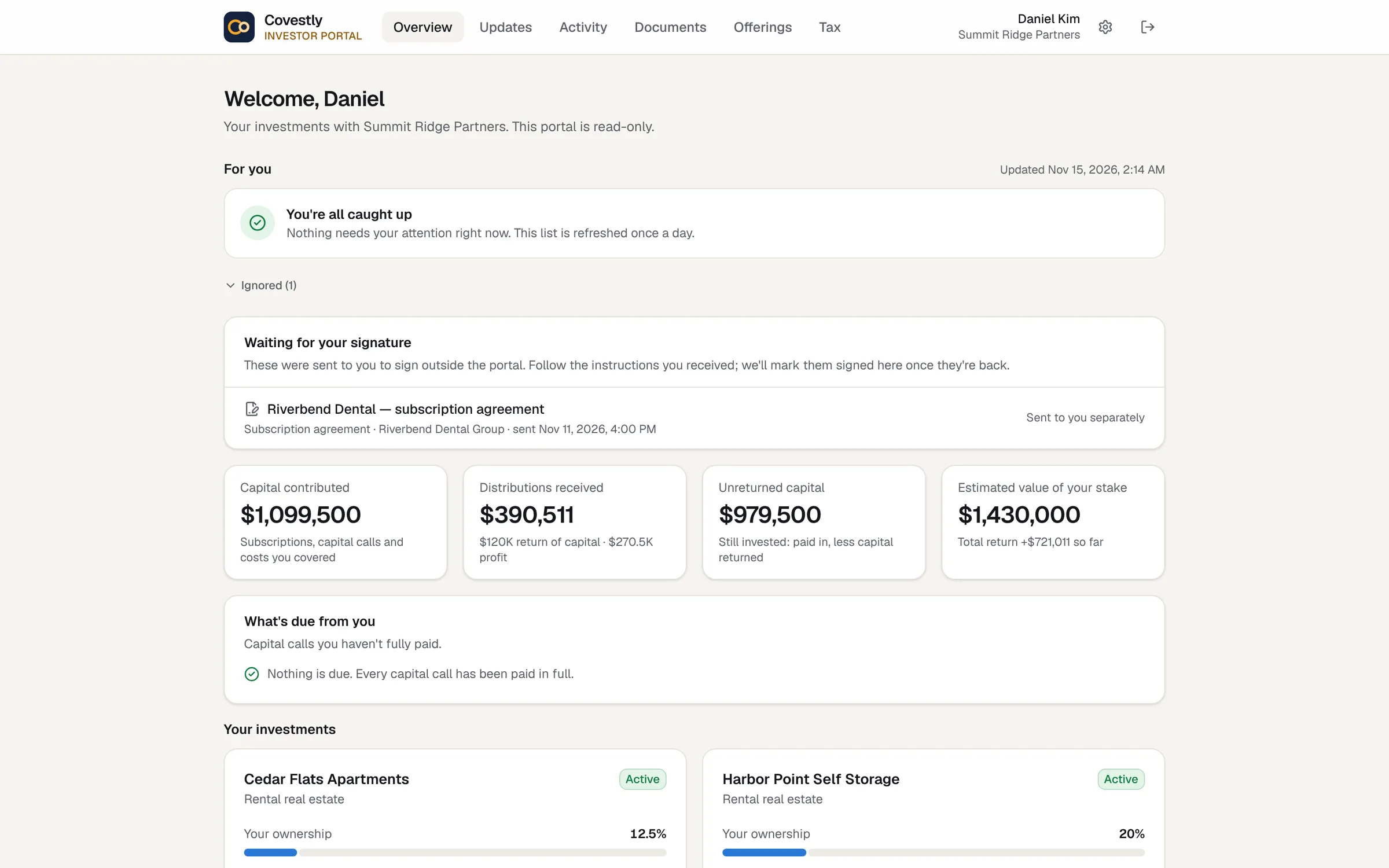
Each investor signs in to their own portal to see what they put in, what they’ve received, what their stake is worth and what’s due. Updates, statements, documents and K-1s are there too, so fewer questions arrive by e-mail.
- 14-day free trial with every add-on
- Investors are always free
- Unlimited staff
- Cancel any time
Without it
Investors shouldn’t have to e-mail you for their numbers
When investor information lives in spreadsheets and inboxes, every question becomes a task: a balance to look up, a PDF to find, a K-1 to send again. Each answer takes your time, and two people can end up quoting different numbers.
- Balances rebuilt by hand for each question
- K-1s and statements sent one e-mail at a time
- No single place showing what an investor still owes
- Documents shared through links nobody can track
Every position, from the books you already keep
The portal reads from the same records your team works in, so there is nothing to publish or keep in step. Each investor sees capital contributed, distributions received and unreturned capital for every investment they hold, and, once the investment has a valuation, the estimated value of their stake. Returns show what was paid in and paid back, the equity multiple, and the IRR once an investment has a year of history.
- Contributed, received, unreturned capital and estimated value
- Equity multiple, and IRR after the first year
- One card per investment they hold
- The same figures as your reports and statements
What’s due, and what to sign
Open capital calls show each investor’s share and what they’ve paid against it. They get an e-mail reminder three days before the due date and another once a call is overdue. Documents waiting for their signature are listed on the overview, and they sign them from the portal.
- Unpaid capital calls with the amount still due
- E-mail reminders before and after the due date
- Documents to sign, signed in the portal
- A notice when a distribution is paid
Run it from the partner app
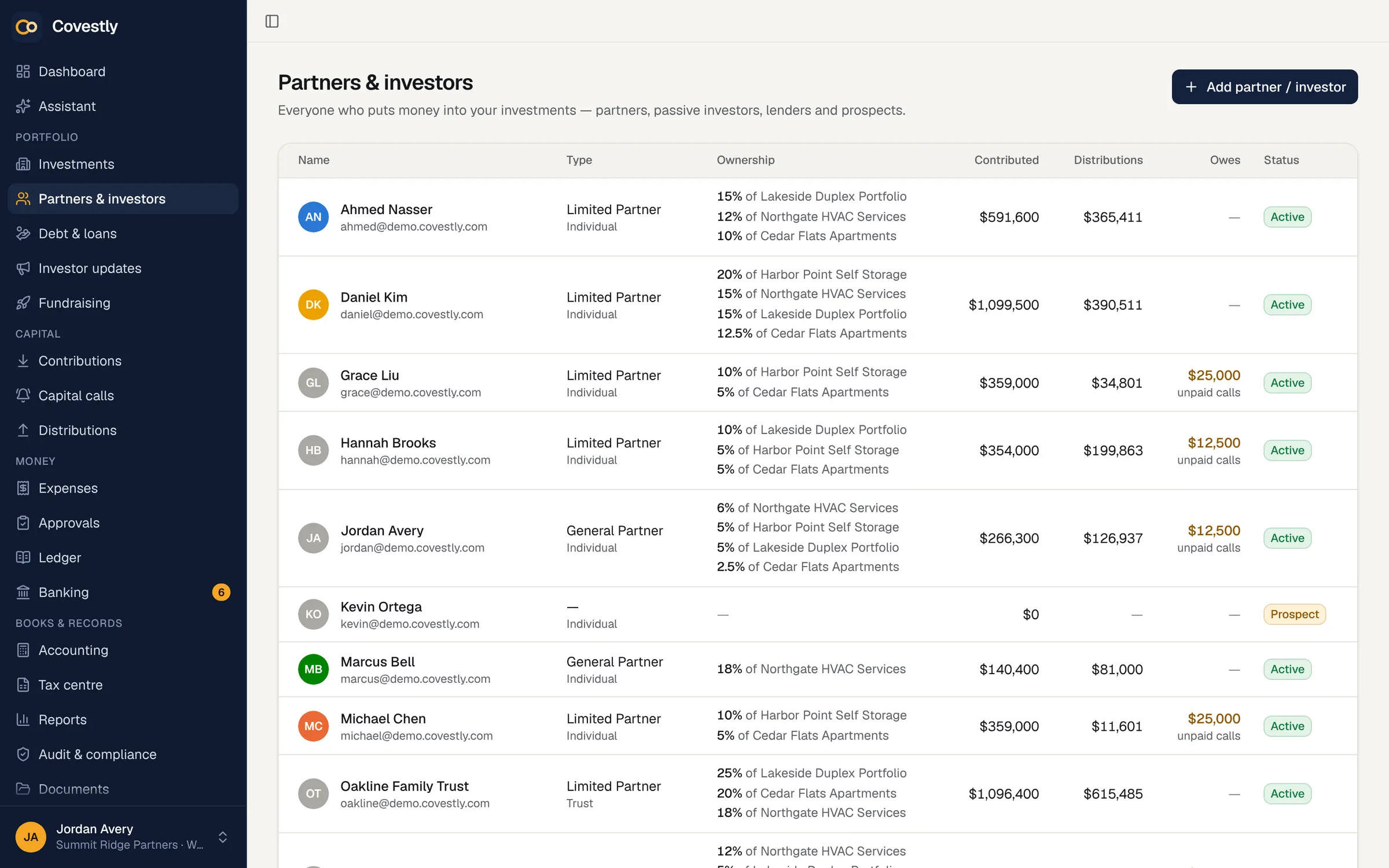
Your team works from the partners and investors list, which shows each person’s ownership across deals, what they’ve contributed and received, and any unpaid calls. Invite an investor from their record and their portal fills itself from what you’ve already recorded.
- Invitations by one-time link, by e-mail or by hand
- Ownership and capital across every deal
- Investor types with their tax standing
- Investors linked to their own record only
Secure by default, and free for every investor
Investors have their own sign-in page, separate from the partner app, and nothing from your team’s side is reachable from the portal. They can add two-step sign-in, a passkey for Face ID or fingerprint, or sign in with Google or Apple. Investors never pay, however many you invite.
- A separate sign-in for investors
- Two-step codes, passkeys, Google and Apple
- Only their own records, never anyone else’s
- No charge for investors on any plan
How it works
Investor portal, step by step
Invite your investors
Send each investor a one-time invitation link from their record, by e-mail or however you like.
They sign in
Investors set a password or use Google, Apple or a passkey, and can switch on two-step sign-in.
Share what they should see
Share a document, send an update or a statement, or publish a K-1, and it appears in their portal.
Answer fewer questions
Balances, returns, calls and documents stay current as your team records activity.
Keep exploring
Works hand in hand with
Investor portal: questions and answers
What is an investor portal?
A secure website where each investor signs in to see their own investments: what they contributed, what they’ve received, what their stake is worth, what’s due, and their documents, statements and K-1s. Covestly’s portal has its own address and sign-in, and nothing from the sponsor’s app is reachable there.
Do investors pay to use the portal?
No. Investors use the portal free on every plan. The base plan covers 250 investors, and larger investor lists are quoted separately.
Can investors see each other’s information?
No. The portal reads only the signed-in investor’s own record and never takes an investor id from the address. Documents filed under another partner, or under a deal the investor doesn’t hold, stay hidden from them.
When does the portal show an IRR?
Paid in, paid back, estimated value and equity multiple show from the start. The IRR appears once an investment has a year of history.
What can investors do besides look?
They can sign documents, complete the investor questionnaire, download statements and final K-1s, and choose which e-mails they receive. With the Fundraising add-on they can also open data rooms you invite them to and subscribe to new offerings.
Does the portal work on a phone?
Yes. It is laid out for phones first, and statements are formatted to read on a narrow screen.
Can the portal carry our own logo and brand colour?
Yes, with the White label add-on ($29 a month, or free with Fundraising): your logo, name and one brand colour on the portal, e-mails to investors in your brand and your logo on their statements. There is no custom web address yet, so the portal stays at Covestly’s address, app.covestly.com, and the sign-in page, which every workspace shares, keeps Covestly’s name.
See your deals the way your investors will
Set up your first deal in minutes. Every add-on is included while you try it.
- 14-day free trial with every add-on
- Investors are always free
- Unlimited staff
- Cancel any time